Scattered everywhere
Half in bookmarks, half in a cloud drive, the rest in chats and your camera roll. Before you can find an asset, you have to remember which app it went into.
Reference images on the desktop, copy buried in chat logs, viral links scattered across bookmarks. Beav gathers images, videos, copy, comment threads, and web pages into one local library with their sources, makes them findable with tags and search, and puts them straight to work in topics, drafts, and covers.
Personal edition is free to download and use · macOS / Windows / Linux
Why saved material goes to waste
For most creators, asset management means bookmarks, a cloud drive, and a chat-to-self thread. Everything got saved, yet none of it answers a simple question when you need it: "What was that post I saved last month about?" Asset management software exists so you can find it next time, and actually use it.
Half in bookmarks, half in a cloud drive, the rest in chats and your camera roll. Before you can find an asset, you have to remember which app it went into.
You grabbed the cover but not the text, or the text but not the comments and source link. Two weeks later, the screenshot no longer tells you why it was good.
No tags, no search, and you give up on page 60 of a reverse-chronological list. The next time something similar shows up, you save it all over again.
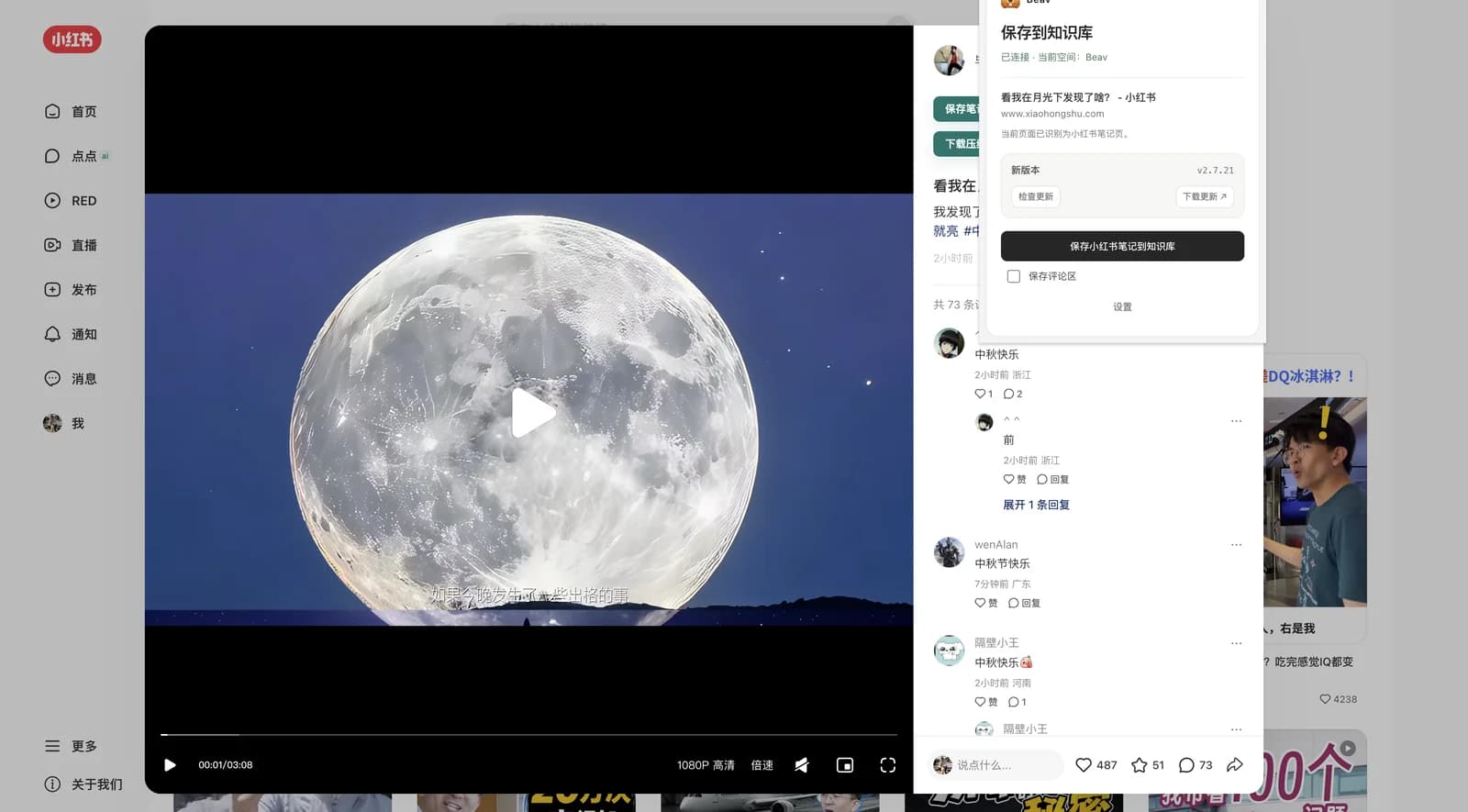
When something is worth keeping, click the browser extension on that page: the title, body copy, original images or video, author, and source link all go into the library, and ticking "Save comments" brings the top comments along too. Xiaohongshu (RedNote), YouTube, WeChat articles, and ordinary web pages can all be saved directly, as can a single image or a selected passage. The extension shows which Beav and which workspace it is connected to, so nothing lands in the wrong account. See what the extension captures
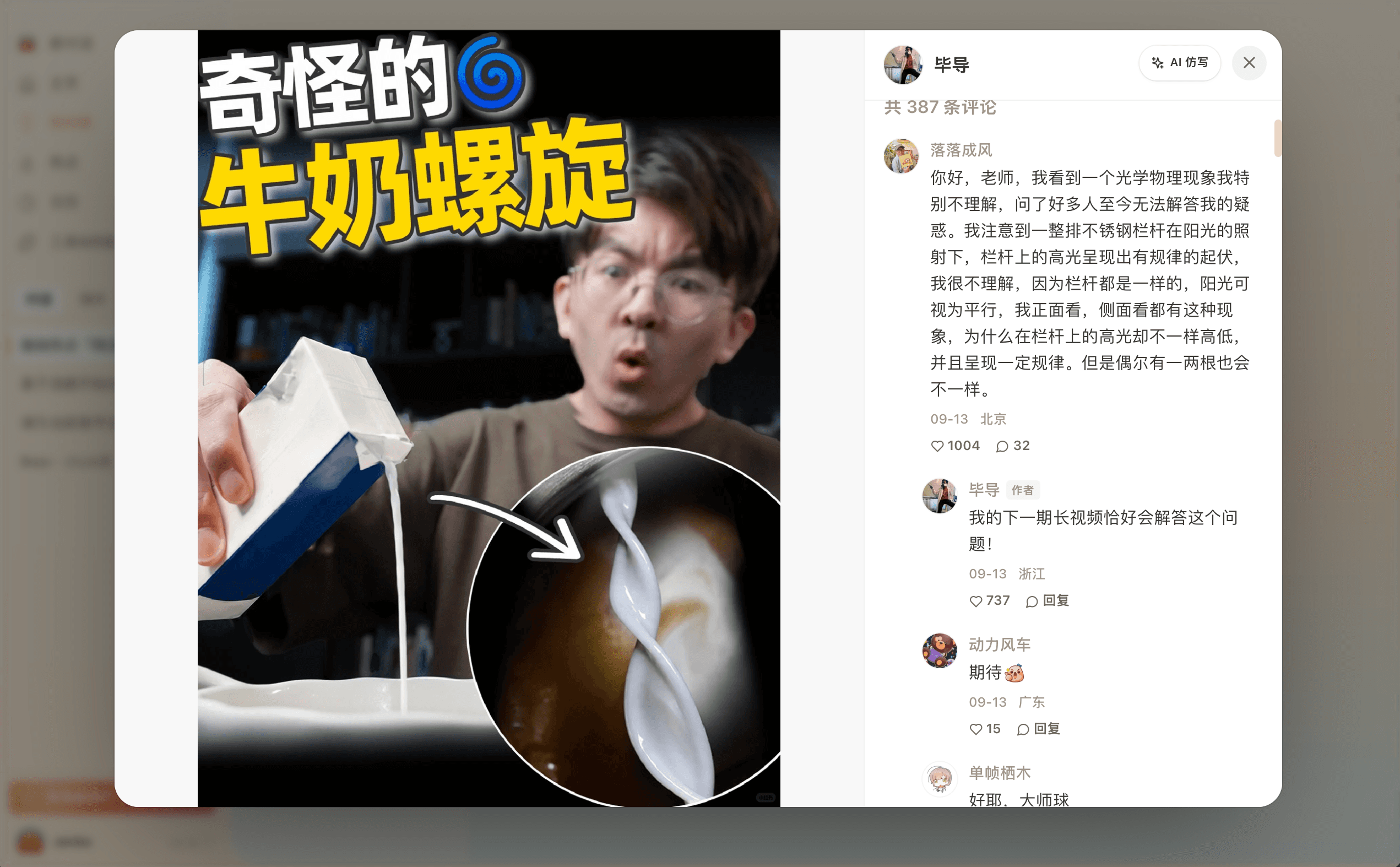
Open any asset and the original images or video, body text, tags, comments, and capture time sit on one page, and videos can be transcribed. Tags and full-text search make things findable; workspaces keep them from mixing. Create one workspace per account, client, or long-running niche, and each account's assets, drafts, and generated results stay where they belong.
Import local images, videos, audio, PDFs, and documents into the current workspace and manage them alongside what you captured. If your design references already live in Eagle, import the open Eagle library from the Inspiration section of the knowledge base: Beav browses it read-only, never copying or changing the originals, and lets you filter by keyword, tag, format, and rating, then reference images straight into a creation chat. Eagle connection guide
Type # in a creation chat to hand posts, comments, and notes from your knowledge base to the AI, so it finds topics and writes first drafts from what you actually captured instead of making things up. When an asset is worth learning from, click "AI Rewrite" on its detail page to start a piece with it as the reference. Generated covers, images, and videos return to the media library, attached to their draft, ready to be found at the next planning session. The full path from capture to finished draft

Method
Tools solve only half of it. These four rules come from our own mistakes organizing material, and they apply whether or not you use Beav.
Choosing a tool
What it manages
BeavImages, video, and audio, plus text assets like post copy, comment threads, and web links
Design asset managersMostly images, fonts, and design source files
How assets get in
BeavOne click in the browser extension on the current page, source link kept automatically
Design asset managersManual drag-and-drop import
After saving
BeavAssets feed topic planning, AI drafting, and cover generation, turning into finished pieces
Design asset managersFocused on archiving and finding; usually no content generation
Existing libraries
BeavConnects to an Eagle library read-only and references it directly in creation chats
Design asset managersEach keeps its own separate library files
Where data lives
BeavSaved in a workspace on your computer by default; account data syncs on demand
Design asset managersLocal library files; some rely on separate cloud services
The comparison summarizes common capabilities from public product information, as a reference for tool selection.
FAQ
Eagle and Billfish are excellent design asset managers built for images and design files. Beav is built for creators: it also manages text assets such as post copy, comment threads, and web pages, and wires the library into topic planning, AI drafting, and cover generation. They work together, too: Beav connects to an Eagle library read-only so you can reference its images while creating.
Beav Desktop and the extension are free to download and use, with capture, tags, search, and knowledge bases working out of the box; AI drafting and image generation follow your account plan.
For Xiaohongshu (RedNote) posts it saves the text, images or video, and comments, and can batch-capture from search pages and creator profiles. YouTube videos, WeChat articles, and ordinary web pages can be saved as the current page, and individual web images and selected text can be saved on their own. Everything goes into the workspace currently open in Beav.
The workspace backs up as a whole, account data syncs on demand, and your assets and knowledge base migrate to a new machine.
Local images, videos, audio, PDFs, and documents can be imported into a workspace, and an Eagle library connects directly in read-only mode with no export and re-import. Once in, re-tag everything around your accounts and projects.
Yes. Team collaboration organizes asset libraries, topic pools, and drafts per team, so content teams can share one set of assets.

Install the capture extension and let saved images, videos, and copy go straight into topic planning, drafting, and covers.